

HIPAA compliant charting for chiro clinics
Chiropractic EHR and charting,
right next to your schedule.
Your schedule lives in one app, your notes in another and patient texts in a third. Every visit means jumping between systems. We put charting in the same app as your booking and patient messages, so the note is right there when the patient is.
- Booking, texts and charting in one app
- Included in your plan

Live in 14 daysNo contract. No setup fee.
- Quick SOAP notes
- Next to your schedule
- One file per patient
- Intake before the visit
- Card on file and packages
- HIPAA compliant
In a lot of clinics, the schedule lives in one app, charting in another and patient texts in a third, each with its own login and its own bill. None of them share your patient list: the front desk retypes names, and doctors click between screens from one patient to the next.
Same doctor, same morning
Same doctor, same morning
Linda Nguyen, after her follow-up visit


Where the time goes
- 1A login for every app. Schedule, charts, texts and checkout each live somewhere else.
- 2Names typed twice. None of them share a patient list, so someone retypes it.
- 3Paperwork on a clipboard. Someone types the forms in later.
- 4Texts nowhere near the chart. "Running late" lands in a different app.
What one app fixes
- One app, one login. Schedule, charts and texts in one place.
- One patient list. Book once and their chart is already there.
- Quick SOAP notes. Right next to the day's schedule. HIPAA compliant.
- Intake forms before the visit. Filled in at home, saved to the chart.
- Texts beside the note. "Running late" shows up where you chart.
- Checkout built in. Card on file, packages and memberships.
- Past charts moved over. Or kept in sync with the system you use now.
Signed and in one file
- SOAP note signed. Started from her last note, locked once signed.
- Her visits. Past visits and the next one booked, on the same page.
- Her texts. "Running 5 min late" sits right beside the note.
- Her older notes. Moved over from your old system.
How it works
Forms, notes, checkout: one app the whole way
The patient's file follows them through the visit.


A new patient books online and gets their intake and consent forms before the visit. They fill them in at home, and the answers land in their chart, not on a clipboard.
Your day's schedule and SOAP notes sit side by side, with the patient's intake answers already in the note, so you're not switching systems mid-visit. Charting is HIPAA compliant.
Sign the note and check out in the same app: card on file, packages or memberships. Rebooking texts then go out on their own, timed to each patient's care plan and last visit.
What's built in
Charting that keeps up with your day
SOAP notes
Quick SOAP notes
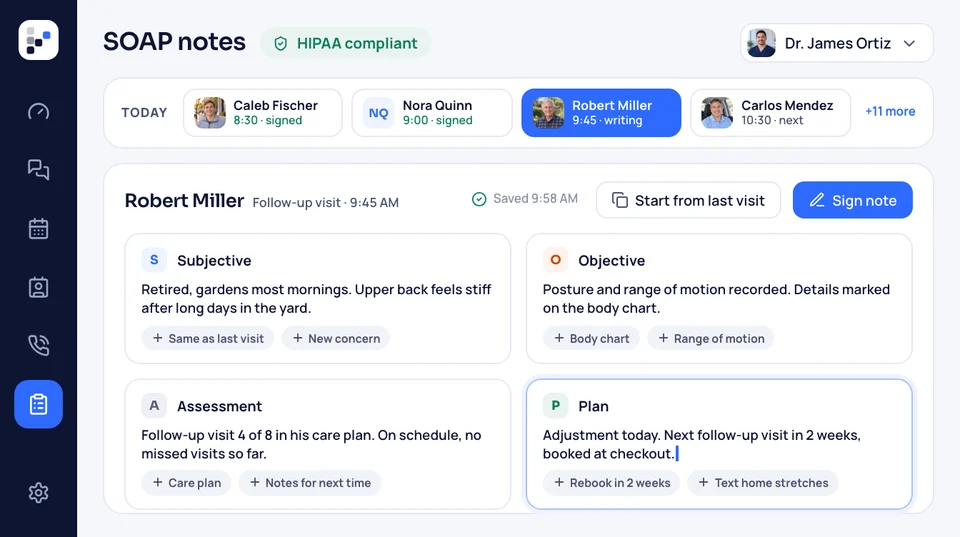
Write your SOAP notes in the same app that runs your schedule. The day's patients are right there, so you go from the schedule to the note and back without logging into anything else. Charting is HIPAA compliant, and so is patient texting.
- Where it livesright next to your schedule
- HIPAA compliantcharting and patient texting
Patient file
One file for every patient
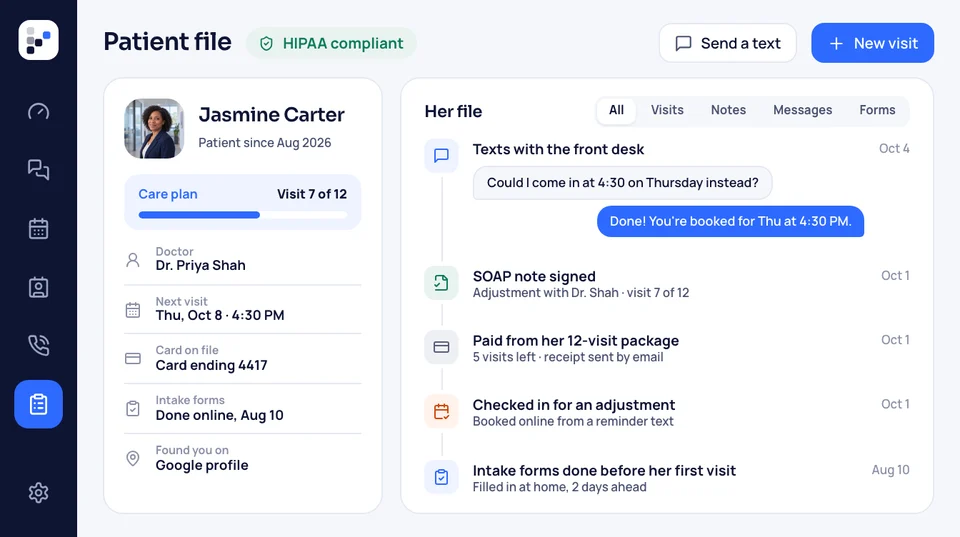
Each patient has one file with their visits, notes and messages in it. The whole story is in one place, instead of spread across three systems that don't talk to each other.
- What's in itvisits, notes and messages
- Good fordoctors and the front desk alike
Intake forms
Intake forms before the visit
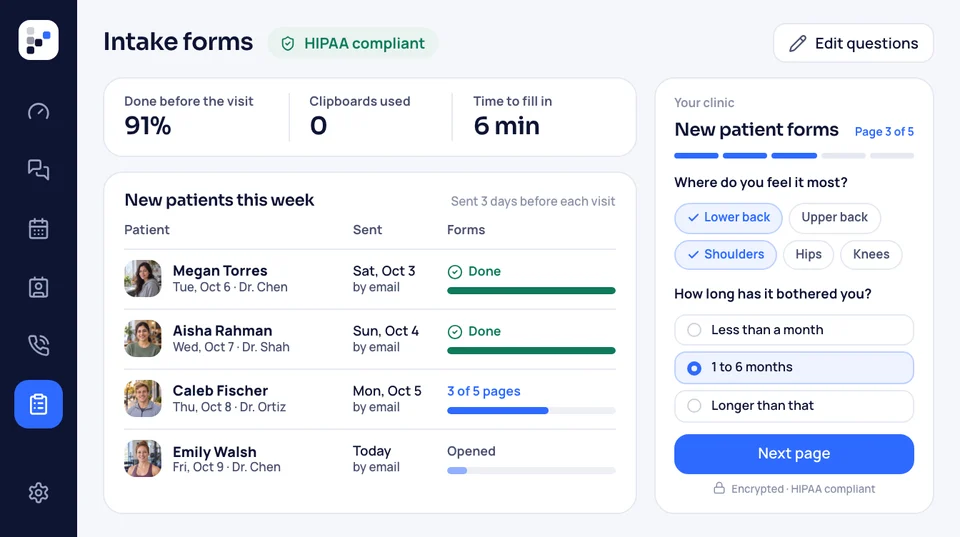
Intake forms go out before the visit, so new patients can fill them in ahead instead of on a clipboard in your waiting room. Each visit type can carry its own reminder notes, so new patients know what to do before they come in.
- Good fornew patients and a calmer front desk
- When it goes outbefore the visit, to fill in ahead
Payments
Card on file, packages and memberships
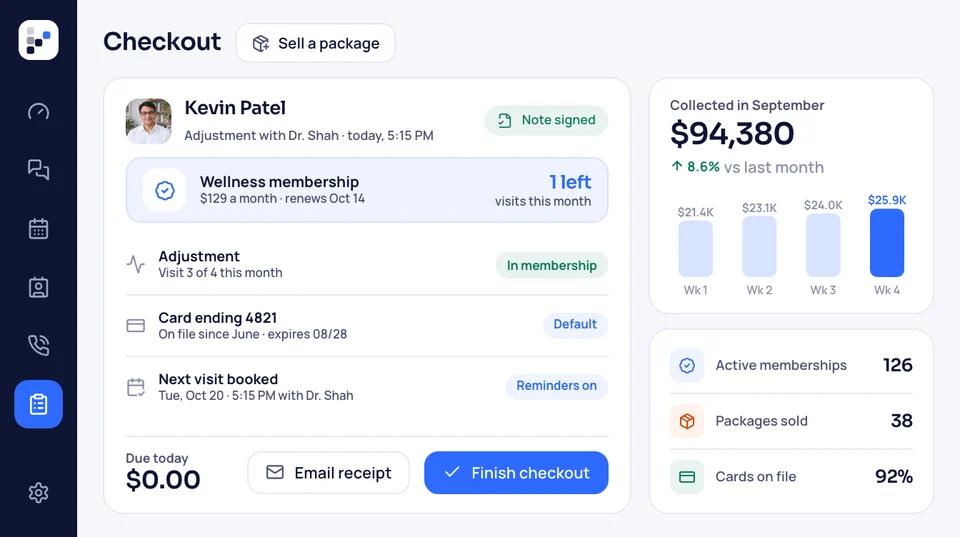
Keep a card on file, sell packages and run memberships in the same app as your schedule and charts. The front desk handles checkout without opening another system, and you can take a deposit or save a card when patients book.
- Good forcare plans, wellness visits and repeat patients
- Where it livesin the same app as your schedule and charts


Also included
- Charts next to the schedule
- One inbox for every message
- Past charts moved over
- HIPAA compliant, with a BAA
- Staff training included
- Live within 14 days of the call
One patient list runs the whole clinic
The SOAP note, the next booking and last week's texts all sit in one patient file. That same patient list sends your reminders, review requests and rebooking texts. One app, one plan, one bill.

Charting Every SOAP note sits in the patient's file, next to their visits.
This pageThe rest of the plan
- Analytics and reporting Calls, bookings and where patients came from, in one live dashboard.
- Call tracking A local number per source, so you know who sent each caller.
- Clinic websites A website with booking on every page, written and built for you.
- Online booking Patients book online any time, straight onto the schedule your notes sit next to.
- Ads Google, Facebook, Instagram and TikTok ads that send new patients to your booking page. You pay the ad spend.
- Automation Rebooking timed to each patient's care plan and last visit, sent for you.
- Review requests A Google review request after the visit, on the timing you pick.
Get your free clinic audit
On a 30-minute call we review your website, Google profile and ads, and show you how charting would work next to your schedule. No contract, no setup fee, live in 14 days.


What clinics say

Mark T.Solo clinic 4 → 1monthly billsWe dropped four separate bills for one, and new patients book online now instead of calling.
Michelle A.New clinic 2 weeksfrom first call to runningWe opened this year and had our website, booking and ads running two weeks after the first call.

Sean R.Group clinic Right awaymissed calls texted backMissed calls used to mean lost patients. Now they get a text back right away and most of them book.
Dana K.Family clinic 5 → 1apps at the front deskOur front desk used to juggle five apps. Now every text, email and DM lands in one inbox.

Arjun M.Sports clinic No voicemailwhile we treatWhen we're busy with patients, the AI receptionist picks up, so calls stop going to voicemail.

Nicole L.Two-doctor clinic 1 personto text or callOne person to text when we need something, and a plain-English report every month.


Good to know
Questions about charting
Search for a word, or open the one you're wondering about.
6 questions
Does it do SOAP notes?
Yes. You write SOAP notes in the same app as your schedule, so the day's patients are right there. Charting is HIPAA compliant.
Can we bring our old charts over?
Yes. We move your patient list, past charts and SOAP notes over, or connect to the system you use now and keep notes in sync.
Do you handle insurance billing?
No. Insurance billing and claims stay with your current setup. Checkout and payments do run in the same app.
Can the team use it on a phone?
Yes. The whole team logs in, on a computer or on the phone app.
Will my team have to figure it out alone?
No. Training is included for the whole team, doctors and front desk, and live support is there whenever questions come up.
Is charting HIPAA compliant?
Yes. Charting and patient texting are HIPAA compliant, and we sign a business associate agreement (BAA) with your clinic.
Popular searches
Can't find yours?
Bring it to a free 30-minute call, on video or phone. Shawn will answer it for your clinic.
Shawn SaundersAccount manager
Request a call